Source Code Search Engine

Concept
Programmers spend 50% of their time just looking at source code. Nearly half of this (25% total) is spent in search and navigation of code (reference). When trying to understand how a system is organized, they often must look at and across many files that make up the system.
It is difficult to find code in large software systems of thousands of files coded in multiple programming languages. Often programmers use string search tools such as Unix grep or some IDE editor command. grep searches are not fast on thousands of files, and do not provide any easy way to see the resulting text. IDE searches are limited to at best the current project, not the entire source code base.
The Search Engine provides an interactive interface enabling one to search across a large source code base quickly, using the language structure of each of the languages providing far more precise answers than simple string searches can produce. For any query, the Search Engine offers a list of matches with surrounding context; the user can select a specific match and immediately inspect the source file.
Reference: Singer,LethBridge,Vinson, Anquetill, "An Examination of sofware engineering work practices", Proceedings, 1997 Conference of the Centre for Advanced Studies on Collaborative Research.Search Engine features
- Interactive search and inspection of source code
- Efficiently search across millions of lines of code, tens of thousands of source code files
- Query in terms of language lexical constructs such as identifiers, numbers, operators, string literals or comments to minimize false positives
- Generic queries can match identifiers or string literals across multiple programming languages
- Complex queries can match complex statements
- Queries can have patterns (or regular expressions) on character strings
- Numbers can be compared to values or ranges
- Language elements are normalized so escape conventions do not confound searches
- Searches ignore language-specific intervening whitespace, linebreaks and comments, providing more accurate answers
- Optional grep-like string (regular expression) search
- Scrollable list of search hits with context
- Logs list of search hits for later investigation
- Immediate visibility of matching source files with highlighted search hits
- Immediate access to source file text corresponding to any individual hit
- Launch your favorite editor on source file found by search
- Can handle many computer languages in the same session/query
- Translates arbitrary characters sets (ASCII, ISO-8859-1, Unicode, Shift-JIS, EBCDIC, and a wide variety of Microsoft code pages) into a uniform representation for indexing and display.
Screen Shots
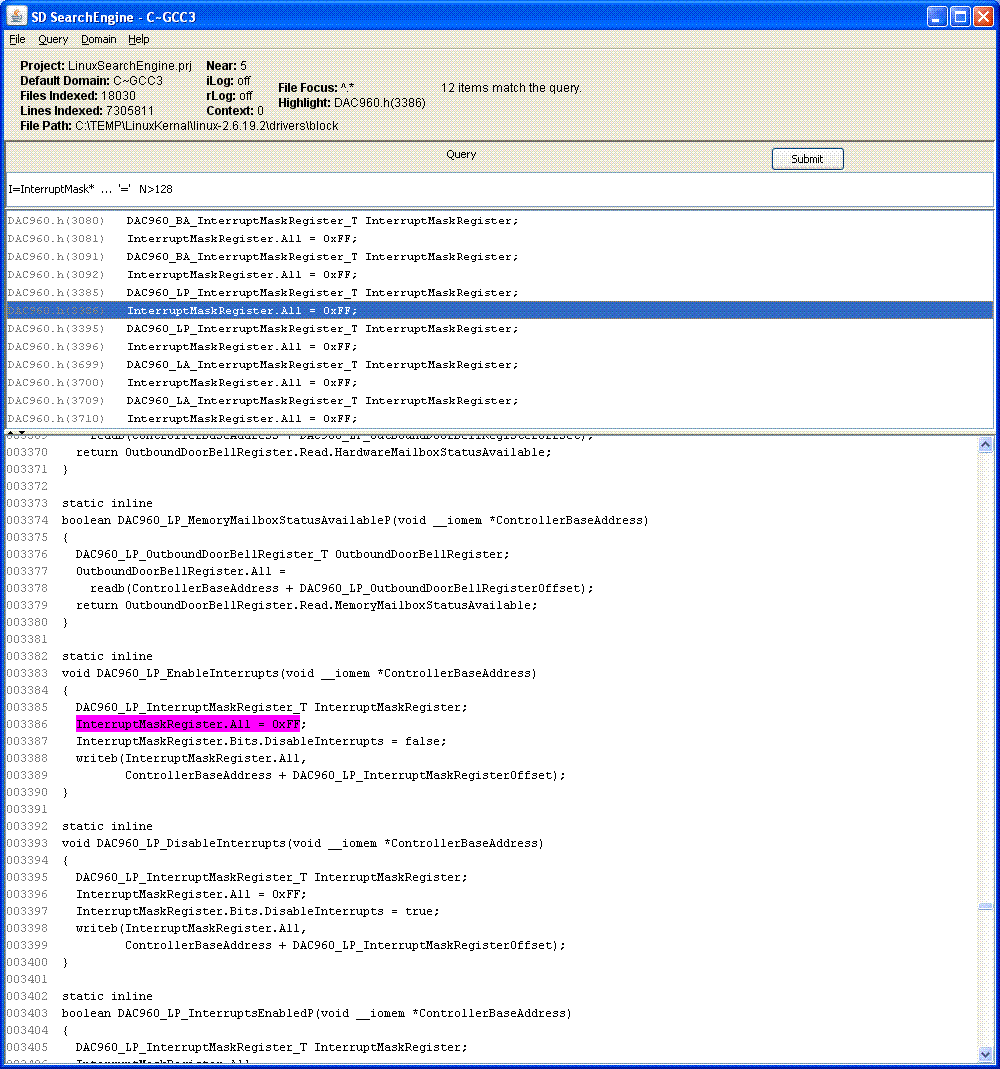
- See a screen shot of query and results against 7.3 million line C source code for the Linux kernel. The example shows a search for an assignment of larger values to interrupt mask variables, roughly InterruptMask_something near = a_number_larger_than_128. (Try writing this query in grep!)
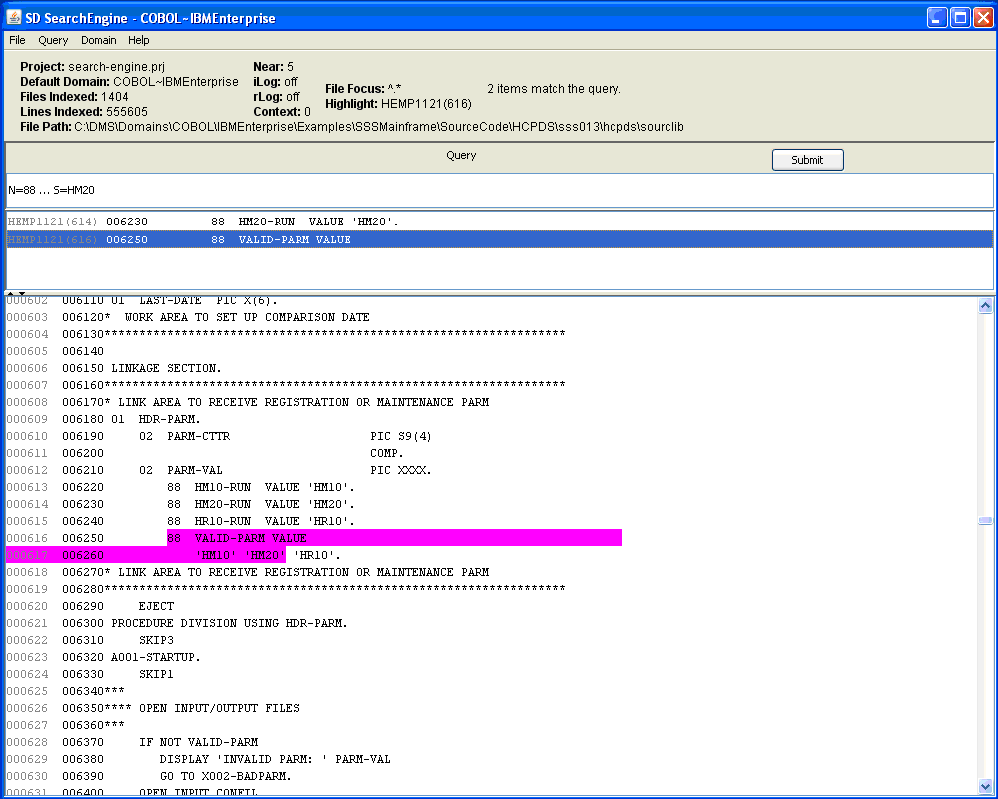
- See a screen shot of a query and results over 560,000 lines of code including IBM Enterprise COBOL. This query searches for declarations of 88-level condition variables keying on the literal string value 'HH20'. A proxity setting of 5 lexemes allows up to 5 lexemes between the search target lexemes, 88 and 'HH20'. White space is ignored, so the multi-line definition can be found, unlike with grep.
- See a screen shot of a query and results over 560,000 lines of code including both IBM Enterprise COBOL and Java. This example shows a search for occurrences of any variable, either COBOL or Java, whose name begins with the prefix "temp". Matches are found in both Java and COBOL code, and one such match from COBOL is selected for display in the code browser frame. Here the search is over all files included in the project that constructs the search index, but a file focus can narrow the search space within the project, for example to all the "*.java" files.
- See a screen shot with query and results against a 2 million line Natural mainframe application. The example shows a search for an identifier containing a desired variant of an application TAX.
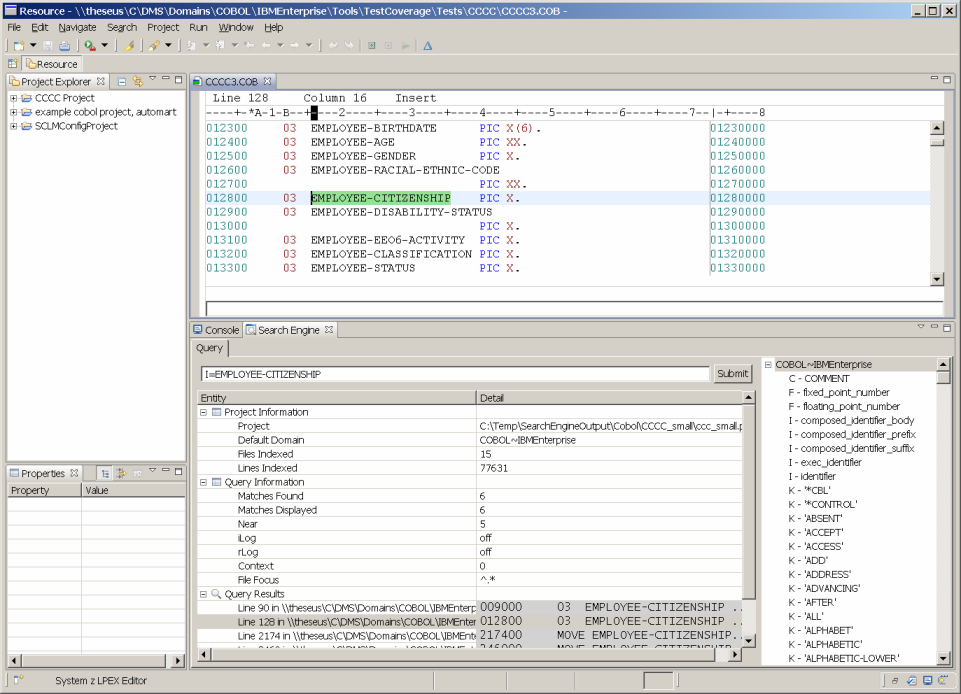
- Here is a screen shot illustrating a different graphical user interface which Semantic Designs developed for the Rational Development for System Z™ (RDz) Environment. The screen is organized differently, but conveys the same information. The pane in which the target code appears is an editor which in this case specifically supports COBOL. Search engine results are produced in an XML format that is amenable for communicating with other GUIs as well.
Metrics
The Search Engine computes Cyclomatic and Halstead Complexity metrics, as well as Source Line, Code Line, Comment Line and Blank Line counts for each of the files indexed. This gives users an easy way to determine the relative complexity of system modules of interest. You can see an example metrics result file.
Productivity Comparison with grep on Linux kernel
(7.3 million lines, 18030 files, mixed C and ASM files)
2.8 Seconds: Source Code Search Engine
Using a search query:
I=Interrupt*
to find an identifier starting with Interrupt takes the Search Engine 2.8 seconds. It finds 229 hits only in identifiers (because that's what was asked). It looked only at .c, .h, or .S files. Using the UI, you can scroll forwards and backwards through the short list of hits easily to select one. You can click on a hit to instantly see it in the context of the full source text file with the hit highlighted.
56.6 Seconds: grep
Using cygwin grep for the same task:
grep Interrupt -R C:\work\linux-2.6.19.2
takes 56.6 seconds and produces 5297 hits (most of them in comments or in the middle of identifiers we didn't want). Looking at 5297 hits is frankly crazy. After deciding what the right hit is, you still have to type the file name into your editor to see the full source text around the file. With considerable thought you might write a grep regular expression that weakly approximates what the Source Code Search Engine does more carefully (consider ignoring hits in strings and comments). But that will take you much longer than a minute. grep climbed through some additional 2000 files in Linux directories that aren't .c, .h, or .S files, adding to its cost. You can also write a more complex find and grep command that will filter out the unwanted files. But that requires thought and more typing.
Difference in productivity: 20x or better on just the search part. Since the Search Engine also shows you the full source text with a single click, you can examine a lot of hits in context very quickly.
Examples run on Intel i7 2.39 Ghz Windows XP with 5200 RPM disk, 6GB RAM, source code files defragged before test. Both samples run twice to fill the cache, with second value reported here.
Download an evaluation version for Java, C#, C++, COBOL and Pseudo code
Technology
Computer languages are typically structured from a set of allowed elements ("lexemes"), such as identifiers, strings, numbers, operators and punctuation, as well as various kinds of text blocks such as blanks and comments which are ignored by langauge processors. The Search Engine uses a language-specific scanner to scan each source file and break it into lexemes according to the precise rules for that language. These scanners are derived from the language definitions used by DMS Software Reengineering Toolkit, which is used for language-accurate analysis and transformation. Lexemes with variable content (identifiers, strings, comments, numbers) are converted from thier source code format to a normal form so that character escapes and radix differences are removed, making searches much easier to specify across languages. Scanned lexemes are then indexed to enable fast searches.
It is expected that the complete set of source files of interest are collected, scanned and indexed on a periodic basis, such as daily or weekly. The collected sources are available to the Search Engine for display.
The Search Engine is presently available on Windows 2000, XP, Vista and Windows 7.
Available Lexical Scanners for Search Engine
SD offers a family of lexical scanners based derived from DMS. Presently available are:
- AdHoc Text (allows scanning of a "generic" programming language, and/or documents containing English text as phrases or paragraphs of sentences,such as email.)
- ABAP (has been used on a system with more than 1 million ABAP files)
- Ada 83, 95
- C# 1.2, 2.0, 3.0 (with LINQ syntax) and 4.0
- C++, for ISO/IEC 14882 "ANSI", Microsoft Visual C++ 6, MS Visual Studio 2005, GCC2/3/4 dialects
- C, for ISO/IEC 9899 "ANSI", Microsoft Visual C 6, MS Visual Studio 2005, GCC2/3/4, and Green Hills dialects
- COBOL, for ANSI85, AS400, IBM VS COBOL II, and IBM Enterprise dialects
- ECMAScript (JavaScript)
- Fortran 77, 90, 95
- HTML (or XHTML)
- JCL
- JOVIAL MIL-STD 1589-C
- Java 1.4, 1.5 and 1.6
- MUMPS (ANSI/VA compatible)
- NATURAL
- Perl 5 Only Perl can parse Perl? Wrong!
- PHP 4 and PHP 5
- Python 2.6 and 3.0
- PL/SQL 10g, 11g
- Progress 10 (OpenEdge)
- VB.net, VBScript and VisualBasic 6
- XML
The following scanners are Beta. Early adopters, please inquire:
- ActionScript 2.0, 3.0
- Ada 2005
- BAL 370/HLASM
- COBOL (MicroFocus)
- JSP
- (CA) PLEX
- PL1 G
- Ruby
- Scala
Custom Scanning Options
Semantic Designs can build custom scanner with special features:
- Unusual languages or dialects
- Text documents with structure